Solving the workbook equations
A separately assembled sparse LU solve agrees with the Gauss–Seidel reference within 1.17e-9 scalar units across four examples. Desktop Excel was also recalculated, edited, saved, and reopened.
Computational fluid dynamics, cell by cell
Your spreadsheet is the solver.
Change a cell. Recalculate. Watch a scalar field take shape across 2,501 formulas. A working convection–diffusion model you can open, inspect, and make your own.
.xlsx · Desktop Excel · No macros
01 / Open Excel. Make it move.
The mesh is a worksheet. Each interior formula reads its neighbors. Excel repeats the calculation until the discrete transport equations settle.
Open the Model sheet. Set velocity, diffusion, or the square’s scalar value.
Enable iterative calculation: 10,000 iterations, maximum change 1E-10. Press F9 to recalculate.
Read the heatmap, then open Field to inspect the equations and residual.
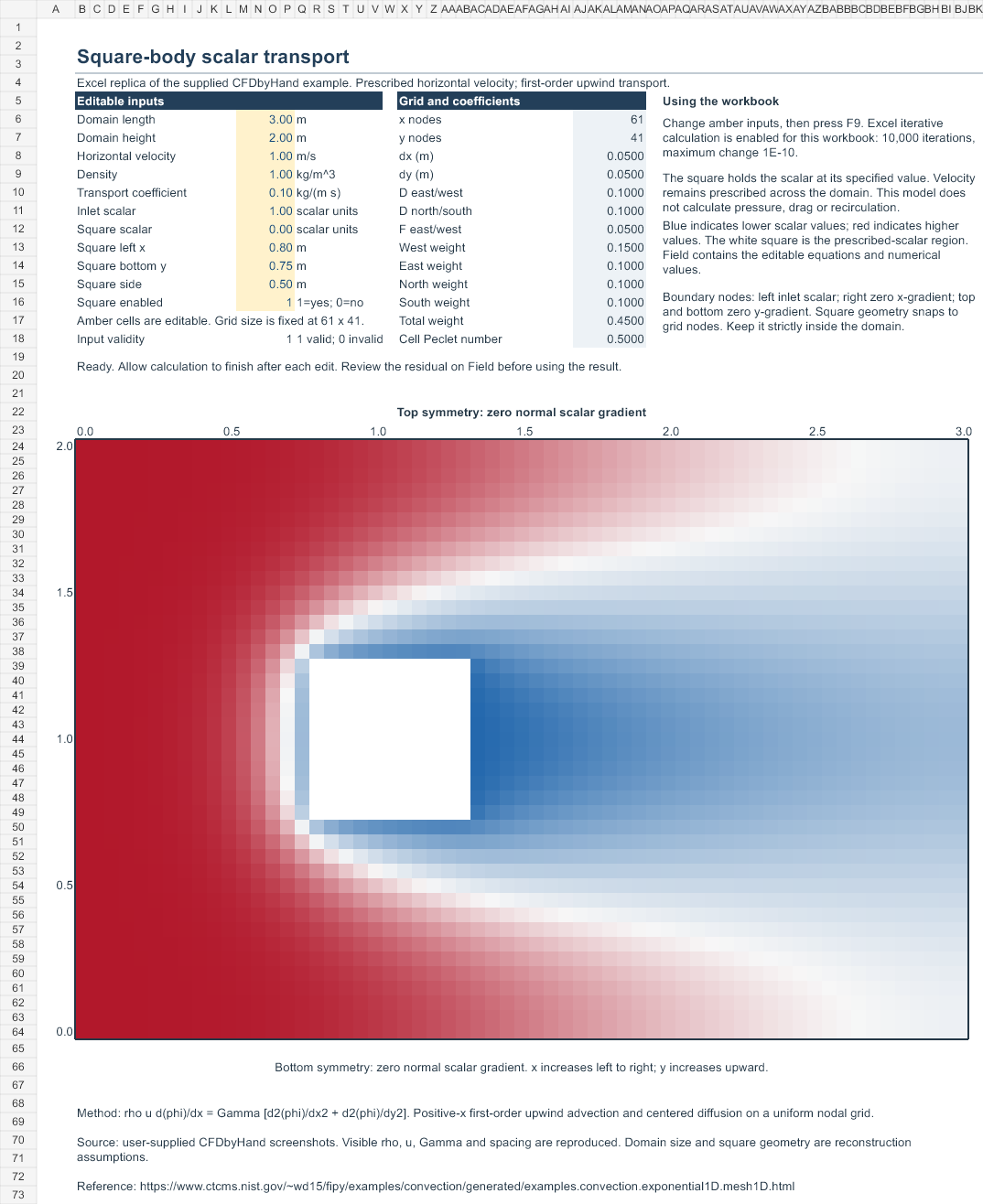
The CFD lesson: scalar convection–diffusion with prescribed horizontal velocity. This workbook teaches the transport discretization used in CFD. It does not solve velocity or pressure around a solid; the colored deficit is a scalar field.
02 / A CFD solver running on the page
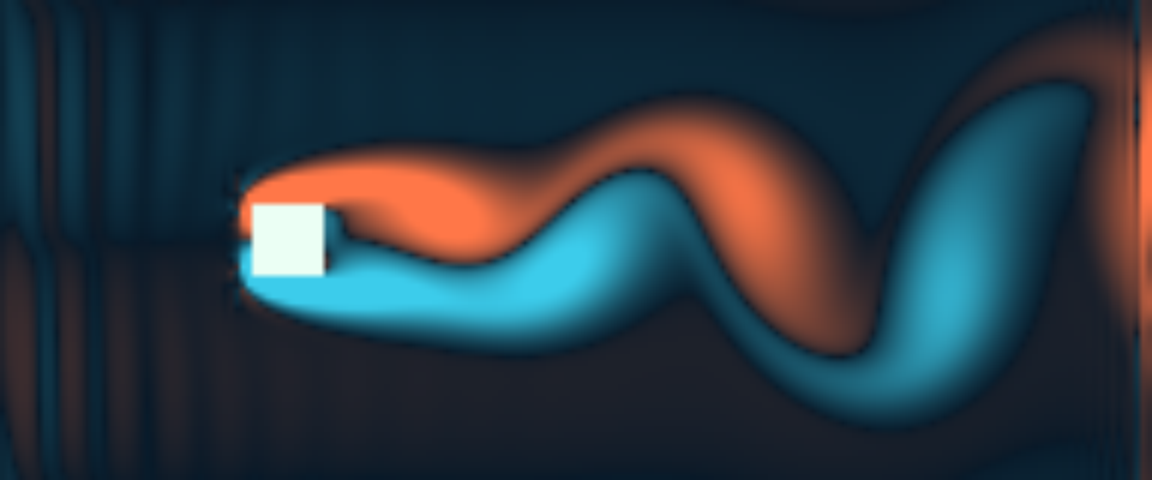
Fluid passes a no-slip square and develops an unsteady wake. Every frame comes from new time steps of a two-dimensional lattice Boltzmann solver. Switch between the computed vorticity, speed, and pressure fields.
Loading the fluid simulation…
The initial state was computed for 12,000 time steps.
Vorticity × D/U · blue negative / orange positive
The solver advances from a computed wake state and automatically repeats a 12,000-step run. Pause freezes the calculation; restart returns to the initial wake. Reduced-motion preferences pause playback.
D2Q9 lattice Boltzmann with two relaxation times, halfway bounce-back at the square, a velocity inlet, a density outlet, and periodic upper/lower boundaries. Grid: 192 × 80; square: 12 cells; inlet speed: 0.065 lattice units; kinematic viscosity: 0.00975; Reynolds number: 80.
The live example solves density and momentum. The downloadable Excel workbook and its PDF cover the earlier steady scalar-transport exercise. They have a separate verification record.
Uniform-flow preservation, Taylor–Green analytical decay at two resolutions, and a 24,000-step wake run are recorded in the live CFD checks. This coarse browser demonstration has no experimental validation or established grid independence.
Solver source · Method and reproduction · Zou–He boundaries · TRT formulation
Workbook comparison / steady scalar transport
Explore the same discrete model here before opening the workbook. This preview runs in JavaScript; the downloaded workbook calculates with native Excel formulas.
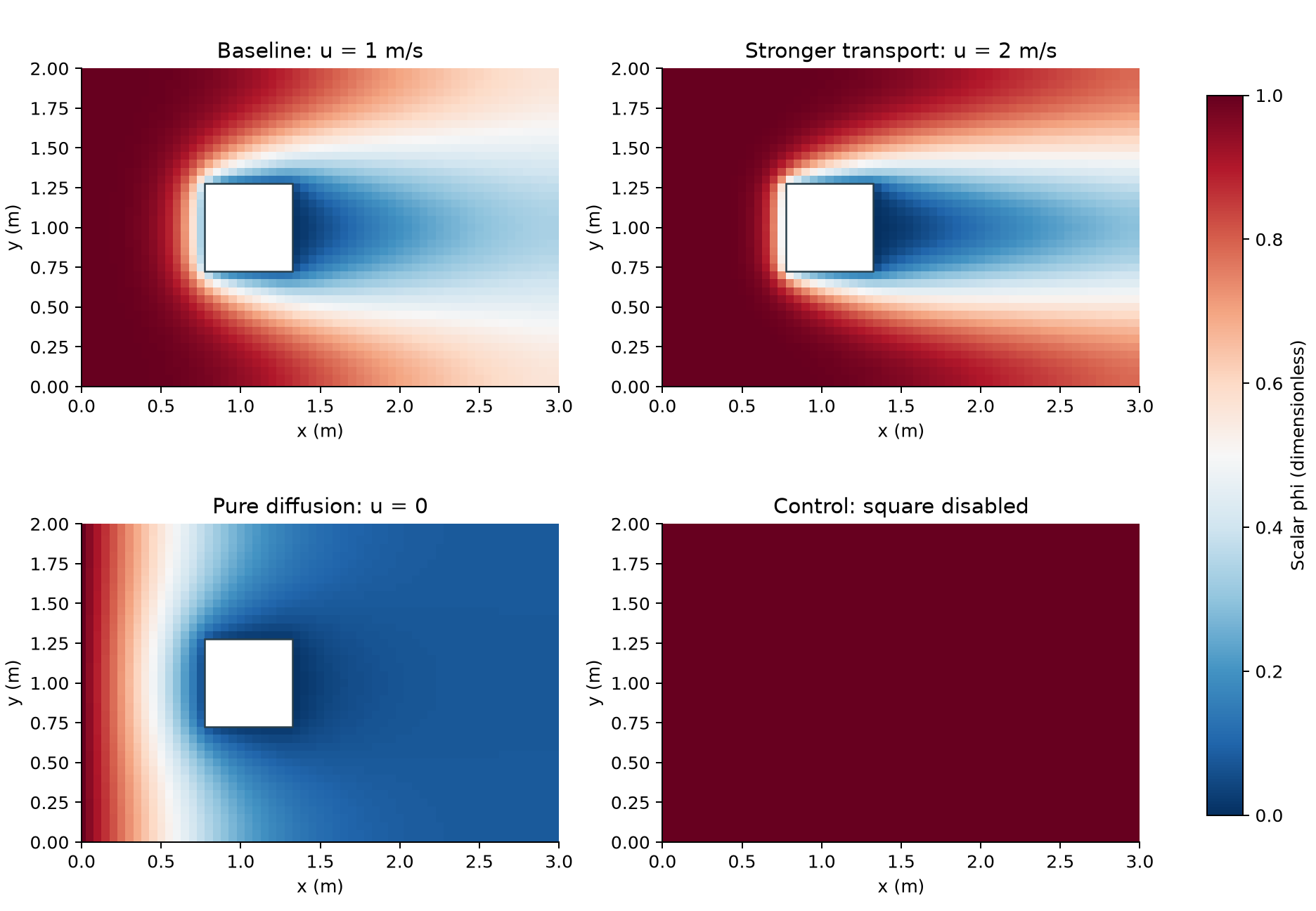
Recorded examples are shown. Enable JavaScript to run an editable calculation.
Use a pointer over the completed field to inspect a node, or download its numerical values.
The display switches to your calculated field after a successful solve.
03 / The spreadsheet, checked
A separately assembled sparse LU solve agrees with the Gauss–Seidel reference within 1.17e-9 scalar units across four examples. Desktop Excel was also recalculated, edited, saved, and reopened.
The 1D analytical test has maximum error 0.07643 at h = 0.05, falling to 0.01120 at h = 0.00625. This is a different boundary-value problem used to check the scheme. It is not a square-case error bound.
The Excel workbook transports a scalar in a prescribed velocity. Its verification does not establish pressure, no-slip flow around a solid, drag, recirculation, or vortex shedding. The live CFD solver above has its own numerical checks.
First-order upwind adds leading streamwise numerical diffusion Γnum ≈ ρuΔx/2. For the baseline, this is 0.025 kg/(m s), or 25% of the specified Γ. That coefficient ratio is not a percentage solution error.
| Grid | Δx (m) | φ at (2,1) | φ at (3,1) | Max common-node change |
|---|---|---|---|---|
| 61 × 41 | 0.0500 | 0.194275 | 0.338126 | — |
| 121 × 81 | 0.0250 | 0.199701 | 0.348439 | 0.04701 |
| 241 × 161 | 0.0125 | 0.202145 | 0.353281 | 0.02721 |
The maximum common-node changes of 0.04701 and 0.02721 show remaining mesh dependence. Tight solver residuals do not remove that error. Corner gradients and first-order boundary copying also affect convergence.
04 / Four experiments. One workbook.
| Example | Velocity | Square | Outlet φ | Field data |
|---|---|---|---|---|
| Baseline | 1 m/s | Enabled | 0.338126 | CSV |
| Stronger transport | 2 m/s | Enabled | 0.290217 | CSV |
| Pure diffusion | 0 m/s | Enabled | 0.077516 | CSV |
| Uniform control | 1 m/s | Disabled | 1.000000 | CSV |
The baseline uses a 3 m × 2 m domain, ρ = 1 kg/m³ and Γ = 0.1 kg/(m s). A 0.5 m square starts at (0.8 m, 0.75 m). Inlet scalar is 1; square scalar is 0. Visible screenshot parameters were reproduced; domain dimensions and square geometry are reconstruction assumptions.
05 / Your turn
Start with the workbook. Follow the derivation in the LaTeX paper. Reproduce the checks with the source and evidence.
The workbook has no macros or external workbook links. Use desktop Excel with iterative calculation enabled: 10,000 iterations and maximum change 1E-10. Other spreadsheet engines have not been checked.
Teaching inspiration: the user-supplied screenshots from @cfdbyhand. This is an independently authored reconstruction, not the creator’s original workbook or an affiliated release. Numerical background: NIST FiPy numerical schemes.